Node dependency detection tool Windows
Virtual product
{{ variable.name }}
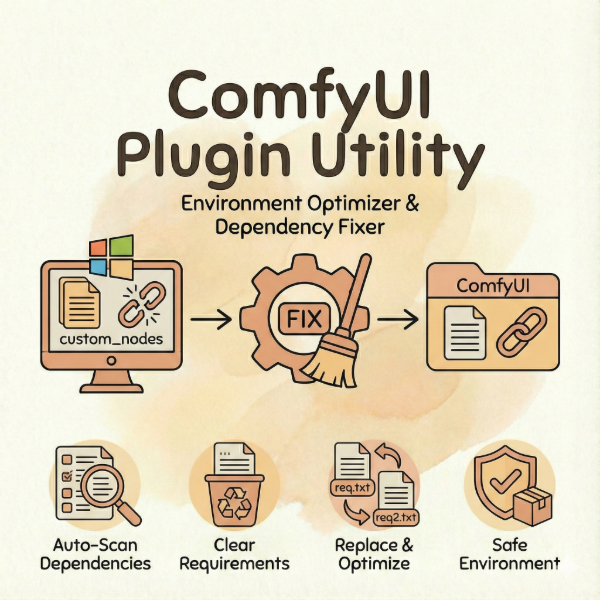
A specialized Windows utility for maintaining and optimizing your ComfyUI plugin environment. Automatically scans all custom_nodes, detects Python package dependencies, and manages requirements.txt files to prevent conflicts, crashes, and compatibility issues — the essential maintenance tool for heavy ComfyUI users.
Product Type: Windows Utility Tool (Executable + Batch Scripts)
The Problem It Solves:
ComfyUI plugins often have conflicting or outdated dependencies that cause:
- Red box errors when loading workflows
- Plugin crashes and unexpected behavior
- Version conflicts between different custom nodes
- Broken environments after installing new plugins
Core Features:
- Automatic scanning: Recursively scans all folders in custom_nodes directory
- Dependency detection: Identifies all requirements.txt files across plugins
- Two operation modes: Clear all requirements OR replace with optimized versions
- Batch processing: Handles dozens of plugins in seconds
- Zero configuration: Just place files and run — no Python knowledge needed
- Safe operation: Non-destructive with clear console feedback
How It Works:
1. "Clear" mode: Empties all requirements.txt files in custom_nodes (useful for fresh reinstall)
2. "Replace" mode: Replaces requirements.txt with requirements2.txt (for version-controlled updates)
Package Contents:
- Plugin Environment Query Tool.exe (main executable, ~32MB)
- Clear the contents of requirement.txt.bat (clears all dependency files)
- Replace the content of requirement.txt.bat (replaces with optimized versions)
Installation & Usage:
1. Place all 3 files in your ComfyUI root directory (same level as custom_nodes folder)
2. Double-click the desired .bat file:
- "Clear..." to reset all plugin dependencies
- "Replace..." to update dependencies with optimized versions
3. Restart ComfyUI after running
System Requirements:
- Windows 10/11
- ComfyUI installed with custom_nodes folder
- No additional software required
Use Cases:
- Environment cleanup: Reset dependencies after plugin conflicts
- Fresh start: Clear all requirements before reinstalling plugins
- Version management: Batch update dependency versions across all plugins
- Troubleshooting: Isolate dependency issues by clearing and rebuilding
Who This Is For:
- ComfyUI power users with many installed plugins
- Users experiencing frequent plugin conflicts or crashes
- System administrators managing ComfyUI deployments
- Anyone wanting cleaner, more stable ComfyUI environments